
告警:先看看你所在的国家/地区的法律是否允许你这样做。此文章仅作学习用途。必须用于合法用途,本人不承担任何责任。
相关法律法规摘要
中华人民共和国计算机信息网络国际联网管理暂行规定
(1996年2月1日中华人民共和国国务院令第195号发布 根据1997年5月20日《国务院关于修改〈中华人民共和国计算机信息网络国际联网管理暂行规定〉的决定》修正)
第一条 为了加强对计算机信息网络国际联网的管理,保障国际计算机信息交流的健康发展,制定本规定。
第二条 中华人民共和国境内的计算机信息网络进行国际联网,应当依照本规定办理。
第三条 本规定下列用语的含义是:
(一)计算机信息网络国际联网(以下简称国际联网),是指中华人民共和国境内的计算机信息网络为实现信息的国际交流,同外国的计算机信息网络相联接。
(二)互联网络,是指直接进行国际联网的计算机信息网络;互联单位,是指负责互联网络运行的单位。
(三)接入网络,是指通过接入互联网络进行国际联网的计算机信息网络;接入单位,是指负责接入网络运行的单位。
第六条 计算机信息网络直接进行国际联网,必须使用邮电部国家公用电信网提供的国际出入口信道。
任何单位和个人不得自行建立或者使用其他信道进行国际联网。
第八条 接入网络必须通过互联网络进行国际联网。
接入单位拟从事国际联网经营活动的,应当向有权受理从事国际联网经营活动申请的互联单位主管部门或者主管单位申请领取国际联网经营许可证;未取得国际联网经营许可证的,不得从事国际联网经营业务。
接入单位拟从事非经营活动的,应当报经有权受理从事非经营活动申请的互联单位主管部门或者主管单位审批;未经批准的,不得接入互联网络进行国际联网。
申请领取国际联网经营许可证或者办理审批手续时,应当提供其计算机信息网络的性质、应用范围和主机地址等资料。
国际联网经营许可证的格式,由领导小组统一制定。
第十条 个人、法人和其他组织(以下统称用户)使用的计算机或者计算机信息网络,需要进行国际联网的,必须通过接入网络进行国际联网。
前款规定的计算机或者计算机信息网络,需要接入网络的,应当征得接入单位的同意,并办理登记手续。
第十三条 从事国际联网业务的单位和个人,应当遵守国家有关法律、行政法规,严格执行安全保密制度,不得利用国际联网从事危害国家安全、泄露国家秘密等违法犯罪活动,不得制作、查阅、复制和传播妨碍社会治安的信息和淫秽色情等信息。
All you need to prepare:
- A VPS Server.
- A ssh software.
- A Computer.
- Basic acknowledgment of Linux Operating System.
- Patience.
My VPS server OS is Debian x12. So let’s start!
First of all, let’s Update APT Package List.
apt get update
Install shadowsocks-libev.
apt install shadowsocks-libev
If it says E: Unable to locate package shadowsocks-libev
Try to update your APT package list first.
apt get update
And then install shadowsocks-libev.
apt install shadowsocks-libev
If the error occurred again, your APT repository might be outdated. Let’s fix that by modifying the sources.list file in /etc/apt/.
nano /etc/apt/sources.list
And insert these into this file.
deb http://archive.ubuntu.com/ubuntu focal main restricted universe multiverse
deb http://archive.ubuntu.com/ubuntu focal-updates main restricted universe multiverse
deb http://security.ubuntu.com/ubuntu focal-security main restricted universe multiverse
Now, use apt update again, an error might occur:
The following signatures couldn't be verified because the public key is not available: NO_PUBKEY 3B4FE6ACC0B21F32 NO_PUBKEY 871920D1991BC93C
The solution is you need to manually add the missing GPG key.
sudo apt-key adv --keyserver keyserver.ubuntu.com --recv-keys 3B4FE6ACC0B21F32 871920D1991BC93C
Everyone’s GPG might be different.
Now, use apt update, the issue might be solved. If the issue still there, ask AI
After installing, open the configuration file which is /etc/shadowsocks-libev/config.json.
nano /etc/shadowsocks-libev/config.json
At the second line, which says
server:["::1", "127.0.0.1"]
Delete text after server: , and replace it with 0.0.0.0. If your IP address is IPV6, then use :: (double colon). It could let shadowsocks-libev listen all addresses.
Save and quit, restart shadowsocks-libev service by using:
systemctl restart shadowsocks-libev
You might need to allow the shadowsocks-libev port, which is 8388 by default.
ufw allow 8388
Make sure the port is listening:
ss -lnpt | grep 8388
If the output is
LISTEN 0 1024 66.154.109.36:8388 0.0.0.0:* users:(("ss-server",pid=525,fd=5))
Then the shadowsocks-libev is running normally.
Open your proxy utility app, I will use shadowrocket here.
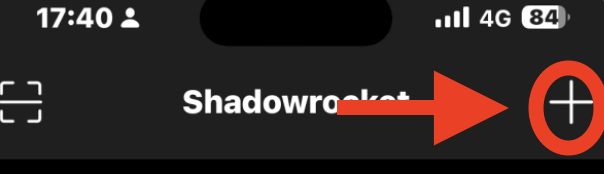
Click on the “+”.
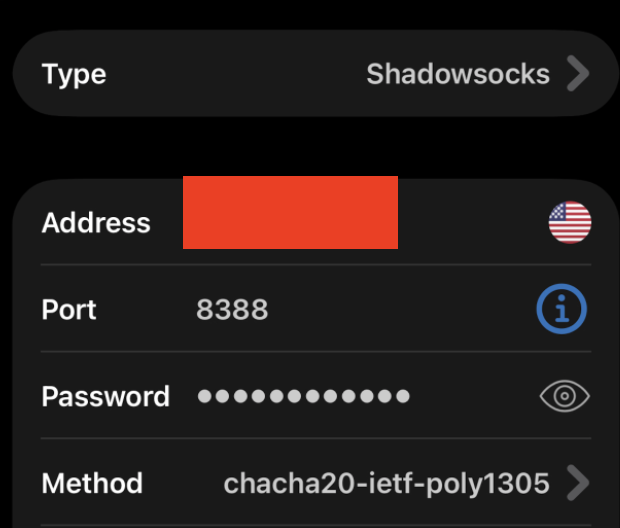
Fill the credentials according to your shadowsocks configuration file.
Caution: If you are using cloudflare, then do NOT fill the domain name, fill the IP address.
Click on “Save” after filling credentials.

Click on the “T” after Connectivity Test.

Click on “CONNECT”.
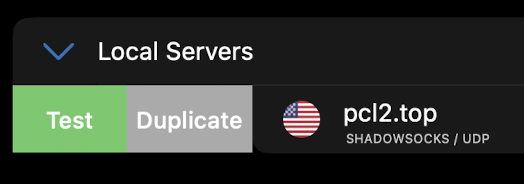
Your VPN should appear on the main menu. Swipe from left to right and click on “Test” button and see if the server is connectable.

Normally it would show the ms value. If it show up “Timeout”, check your configuration or restart.
Click on your server, and set the “global routing” to “proxy”.
Visit ipconfig.me website or any of the website which could show your IP address.
Check if the IP address is as same as your VPS address.
The End
Written by Evandrel
Leave a Reply